

Risks of Not Upgrading Legacy Technology: Costs, Security, and Reliability
The risks of not upgrading legacy technology include greater exposure to security vulnerabilities, rising maintenance demands, unreliable operations, and constraints on business growth. An older platform may still support daily work, but that does not mean it can meet changing business needs or remain easy to maintain. The decision is not simply whether to replace it, but whether its current role still makes sense.
Keeping a familiar system can seem less disruptive than changing it. Yet recurring workarounds, fragile integrations, and slow responses to new requirements can make the status quo increasingly difficult to sustain. The right response depends on the system’s business importance, its risks, and the cost and complexity of change.
This article explains how outdated technology can affect data security, maintenance costs, reliability, and growth. It also covers practical signs that it may be time to act, from persistent support issues to systems that cannot keep pace with users or operations. Modernization does not have to mean replacing everything at once. The next decision should reflect business priorities, not the system’s age alone.
Table of Contents
1. Security vulnerabilities and exposure of user data
Outdated systems can leave weaknesses in software, operating systems, and integrations harder to address. For example, an organization still running Windows Server 2008 may depend on an older platform that creates support and security challenges. That dependency can complicate patching, monitoring, and response when a weakness affects connected applications or stored records. The risk can extend beyond the server itself if other systems rely on its data or services.
Age alone does not prove a system is insecure. The practical question is whether its safeguards can protect sensitive information and support applicable obligations. A hospital using an outdated patient record system, for example, may struggle to meet HIPAA requirements. A bank tied to legacy mainframes may find it difficult to meet PCI DSS, a payment-security standard, if its systems cannot support appropriate safeguards and oversight.
Privacy risks can also build up through everyday access practices. Shared accounts, excessive permissions, incomplete activity logs, or client details copied into spreadsheets can make it harder to determine who accessed information. Trace sensitive records through the system: identify where they are stored, who can access them, how access is recorded, and which connected applications receive copies. This review can reveal gaps between written controls and actual workflows.
For wealth management and financial services organizations, include client records, reporting tools, and vendor connections in the review. A gap between a central platform and a third-party application can expose information, even when the core system has access controls. Map each connection, the data transferred, its business purpose, and the person accountable for access. This brings less-visible data paths into the security discussion.
Migration creates a separate window of exposure. During a move to a new platform, records may pass through temporary storage, test environments, or transfer tools. Reduce risk by limiting access to the migration team, protecting transfer files, using masked test data where appropriate, and reconciling records after transfer. Keep legacy access only for a defined transition need, then remove it through a documented step.
How does legacy technology create compliance and regulatory risks? It can make safeguards, access controls, and evidence of oversight harder to maintain. HIPAA and PCI DSS apply to specific healthcare and payment contexts, so organizations should assess the systems supporting those workflows against the relevant requirements.
A controlled decision starts with system and data inventories, named owners, and documented gaps. Prioritize platforms that hold sensitive information or support regulated workflows. Then decide whether to retain, optimize, integrate, replatform, replace, or retire each system. Build security requirements into the decision, and assign an owner to track actions through implementation.
2. What Are the Signs That You Should Upgrade Legacy Infrastructure?
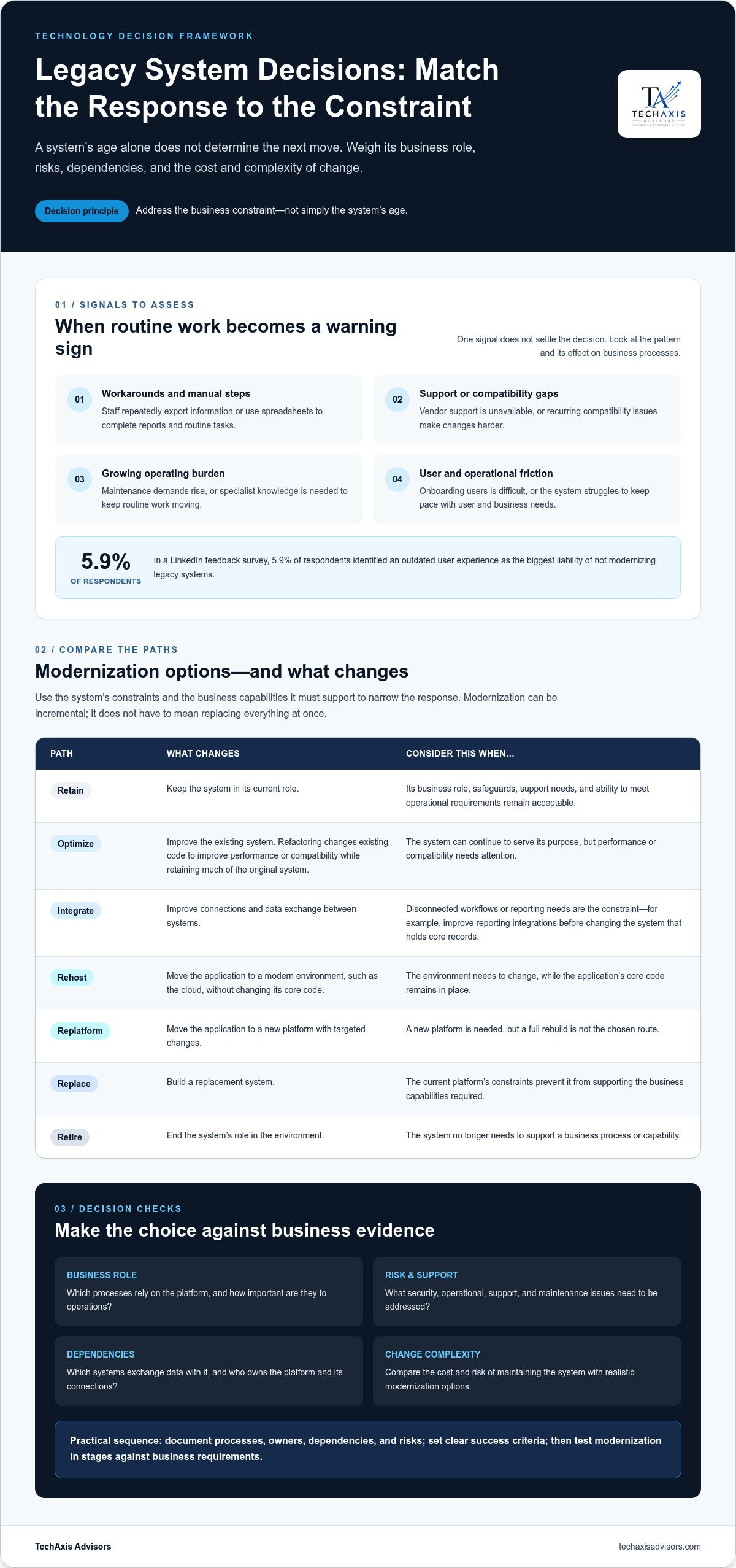
Legacy systems need attention when routine changes require workarounds, specialist knowledge, or repeated manual steps. For example, if staff export information from an older application into spreadsheets before producing reports, the process may indicate integration limits. Other warning signs include unavailable vendor support, recurring compatibility issues, and difficulty onboarding users. An outdated user experience can also affect productivity. In a LinkedIn feedback survey, 5.9% of respondents identified it as the biggest liability of not modernizing legacy systems.
One warning sign alone does not settle the decision. An IT audit can identify weak spots, technical debt, system dependencies, and operational risks. Start by documenting which business processes rely on each platform, who owns it, and which other systems exchange data with it. Compare the findings with business priorities, such as reporting needs, user access, or planned growth. This creates a practical basis for deciding whether to retain, optimize, integrate, replatform, replace, or retire a system.
Modernization does not have to mean rebuilding everything. Refactoring changes existing code to improve performance or compatibility while retaining much of the original system. Rehosting moves an application into a modern environment, such as the cloud, without changing its core code. Replatforming moves an application to a new platform with targeted changes, while a rebuild creates a replacement system. The right route depends on the platform’s constraints, dependencies, and the business capabilities it must support.
Phased modernization can limit disruption by addressing a defined problem first. For example, an organization might improve reporting integrations before changing the system that holds core records. A migration can also proceed in stages, with each stage tested against business requirements before more systems or users move. This gives teams a chance to learn from early work, manage dependencies, and avoid treating the entire legacy environment as an all-or-nothing project.
What steps reduce risk when upgrading or replacing legacy technology? Inventory systems and dependencies, assess risks through an IT audit, and set clear success criteria before selecting a modernization path. Test data flows and business processes in stages, assign decision owners, and maintain a rollback plan for each transition.
If an infrastructure decision spans multiple platforms or business owners, discussing the modernization decision can help clarify the next steps.
Companies can address legacy-platform risks by phasing modernization around specific problems instead of updating everything at once. Plan migrations in stages rather than treating change as all or nothing.
3. Year-over-year increases in legacy-system maintenance costs
Maintenance can become a growing budget commitment even when an older platform appears stable. The average cost to maintain outdated platforms is estimated to increase by 15% year over year. In a DSR LinkedIn feedback survey, 41.2% of respondents identified expensive maintenance costs as the biggest risk of not updating legacy systems. These figures point to a decision leaders should examine: what does continued support consume, and what business capacity does it leave?
The expense goes beyond a maintenance contract. A platform may require specialist support, custom fixes, compatibility work, and manual processes that newer tools could handle differently. For example, if a finance team must reconcile data from two older applications by hand, staff time becomes part of the system’s operating cost. Track these recurring tasks alongside vendor fees and infrastructure expenses.
Technical debt adds another layer of cost. When teams defer updates or build one-off workarounds, later changes can require more testing and coordination. Even a simple reporting adjustment may depend on undocumented code or a specialist who understands the platform’s design. Record recurring incidents, delayed updates, and projects blocked by system constraints. That evidence helps distinguish essential maintenance from avoidable rework.
Skills availability also affects cost and continuity. Older systems may rely on programming languages or architecture that fewer employees understand. If one specialist handles every update, the organization faces a knowledge bottleneck and may struggle to plan changes. Document system dependencies, operational procedures, and technical decisions. Pair that documentation with cross-training so support knowledge does not rest with one person.
How does legacy technology affect productivity, customer experience, and competitiveness? Manual workarounds and slower updates can divert employees from customer and business priorities. If client onboarding depends on repeated data entry across disconnected platforms, delays and inconsistent records can weaken service and limit the organization’s ability to respond to market needs.
Build a cost view before approving a major change. Include direct support, internal labor, integration work, and the operational impact of delays. Separate costs that continue under every option from those tied to a specific modernization path. Then compare retaining, optimizing, integrating, replatforming, replacing, or retiring the system in light of its business role.
A practical review starts with recurring support requests and manual tasks. Assign an owner to each cost, then identify which updates or dependencies drive it. Use that evidence to set priorities and sequence work around business value. A platform that remains affordable to support may be retained, while one that repeatedly absorbs specialist time may call for a different path.
4. System crashes, performance, and reliability
A legacy IT system is an older application, server, or platform that still supports business work. An on-premise server running a core finance application is one example. An older HR platform used to manage employee records and payroll workflows is another. These systems may keep operating, but their dependencies can make failures harder to diagnose and resolve. If a server running a legacy system fails, recovery can take days, if not weeks.
Downtime affects more than access to an application. If a finance platform becomes unavailable near a reporting deadline, staff may lose access to information needed for decisions. If an HR system fails during payroll processing, employees and administrators may face delays and manual work. Map which teams, processes, and external commitments depend on each system. That map helps leaders understand the operational consequences of a failure.
Performance problems may show up as slow screens, delayed reports, or transactions that time out during busy periods. For example, a wealth management team using an older client-record system may have to wait for account information while serving clients. Repeated delays consume staff time and can affect customer experience. Track when slowdowns occur, which functions are affected, and whether connected applications contribute to the bottleneck.
Reliability planning should account for dependencies, not just the server itself. An HR application may rely on a database, identity service, file transfer, or payroll connection. If one component fails, the whole process can stop even when the application appears available. Document these connections, assign owners, and record how teams restore each business function. Test recovery procedures against the actual sequence employees follow.
Outages can also affect reputation. If clients cannot access account information or receive timely updates during a service interruption, their confidence may weaken. A documented incident process should identify who communicates with affected users, who makes operational decisions, and how teams confirm service restoration. For example, define the approval path for a client notice before an outage, rather than improvising during a disruption.
Executives can assess reliability using operational evidence. Review incident records, recurring support requests, failed batch jobs, and employee workarounds. Compare each issue’s impact with the business process it interrupts. Then assess whether to retain, optimize, integrate, replatform, replace, or retire the system. A targeted change to one unstable dependency may be sufficient; a platform that repeatedly disrupts critical work may need a broader plan.
Before changing infrastructure, identify recovery priorities and test the proposed sequence. Confirm that data, user access, and connected workflows function after each transition. This preparation helps teams judge whether a modernization path improves operational continuity, rather than simply moving an unreliable process to a different environment.
5. Scalability and business growth
Scalability is the ability to support changing business demand without redesigning every process around technology constraints. An older platform may handle today’s workload but struggle as a firm adds employees, clients, reporting needs, or new operating locations. For example, a wealth management business may find that onboarding additional advisors requires manual account setup and repeated data entry. The issue is not simply the system’s age. It is whether the platform can support the next stage of the operating model.
Growth often exposes dependencies that were manageable at a smaller scale. A legacy application may rely on a single server, a custom integration, or one team’s manual process. If a private equity-backed company adds a business unit, incompatible data formats can slow consolidated reporting. Leaders should map where increased volume creates extra steps, approvals, or delays. That map helps identify whether the constraint lies in the application, its integrations, or the surrounding workflow.
Desktop and on-premise systems can also limit access as teams become more distributed. Moving a system from a desktop or on-premise server to the cloud can help reduce maintenance costs and improve scalability and flexibility for users. The business case still depends on application requirements, data flows, and operating needs. A cloud move alone will not resolve a manual approval process or an integration that cannot exchange reliable information.
As a business grows, workarounds can become costly in staff time and coordination. Consider a company that combines information from separate customer databases before producing management reports. As transaction volume or the number of business units increases, manual reconciliation can require more effort and produce inconsistent views. Track which processes require repeated data handling, where teams wait for system capacity, and which decisions depend on delayed information. These observations connect infrastructure limits with growth outcomes.
A practical assessment begins with the growth plan. Identify planned changes, such as new services, acquisitions, additional users, or more frequent reporting. Then trace the systems and vendors each change depends on. Compare expected demand with current process capacity, integration limits, and support requirements. This provides a basis for deciding whether to retain, optimize, integrate, replatform, replace, or retire each platform.
Modernization can follow business priorities instead of relying on one large replacement. A firm might first improve data integration for reporting, then address a platform that restricts user access. Another may rehost an application while retaining its core code, then revisit deeper changes later. Set a business outcome for each phase, such as reducing manual handoffs or supporting a new workflow. Review progress against that outcome before committing to the next phase.
TechAxis Advisors: Fractional CTO Services
TechAxis Advisors helps executives turn legacy-technology concerns into prioritized business decisions through Fractional CTO Services. This support is useful when leadership needs to weigh security, operating costs, reliability, and growth before committing to modernization. Rather than assume full replacement, compare whether to retain, optimize, integrate, replatform, replace, or retire each system.
Vendor & Platform Management can clarify platform dependencies and vendor accountability, while Data & Reporting Strategy can address constraints affecting business information and decision-making. For organizations assessing automation opportunities, AI Advisory & Automation Readiness can help evaluate fit and readiness. The focus is executive decision support and practical prioritization, not a default technology replacement plan.
Contact TechAxis Advisors to discuss your technology priorities.
Make the Next Technology Decision Deliberate
The risks of not upgrading legacy technology are best managed as an ongoing governance decision, not a one-time project debate. Assign an executive owner to connect technology choices with business priorities, and agree how leadership will review assumptions as strategy, operations, and dependencies change. This creates accountability beyond the initial approval and helps prevent an interim workaround from becoming permanent by default.
Before committing resources, define what evidence would change the decision. For example, leadership might revisit a system’s role if a new business initiative depends on capabilities it cannot support, or if its operating constraints begin to affect a strategic objective. Clear triggers give finance, operations, and technology leaders a shared basis for action while preserving flexibility about the solution.
A disciplined next step can turn uncertainty into a decision the organization can explain, sequence, and govern. TechAxis Advisors can support that process with executive technology guidance aligned to your business priorities.
With clear ownership and a decision grounded in business needs, you can move forward with greater focus.
Frequently Asked Questions
What Are the Signs That You Should Upgrade Legacy Infrastructure?
A growing backlog of requested changes can signal a mismatch between the platform and business plans. Compare upcoming initiatives with the system’s current capabilities and constraints.
What are the main risks of keeping legacy technology?
Beyond technical issues, legacy platforms can narrow strategic choices. For example, a system that cannot support a planned acquisition may constrain integration planning and leadership decisions.
How does outdated technology increase cybersecurity risks and data breach costs?
Estimate exposure by identifying sensitive data, its business purpose, and the teams responsible for handling it. This helps leaders connect security priorities with business impact.
What are the operational risks of legacy systems, including downtime and reliability?
One system’s failure can affect teams that depend on its outputs. Identify which business functions need priority during disruptions and define decision authority for service restoration.
What are the typical maintenance and support costs of legacy systems compared with modernization?
Compare the full operating burden with the transition effort for each option. Include internal staff capacity and the cost of postponing business initiatives that depend on change.
What risks arise when legacy systems rely on unsupported hardware, software, or vendors?
Vendor changes can affect access to expertise, product knowledge, and continuity. Review contract terms, internal ownership, and the organization’s ability to operate if a supplier relationship changes.
What are the risks of delaying a legacy system upgrade versus replacing it now?
Delay may preserve current workflows but constrain planned change, while immediate replacement demands organizational readiness. Compare both choices against strategic timing, internal capacity, and transition dependencies.
How can organizations assess and prioritize legacy technology upgrade risks?
Use a consistent decision record for each system: business owner, strategic role, key dependencies, and recommended action. This gives executives a shared basis for reviewing priorities.



Thanks for sharing this useful information! Finding a good WebAiry VPS Provider is also something I've been researching recently.